Otcomlab
- 4.7
- Rating
- 100.00K
- Installs
- Free
- Price

 Analysis by App-foxy
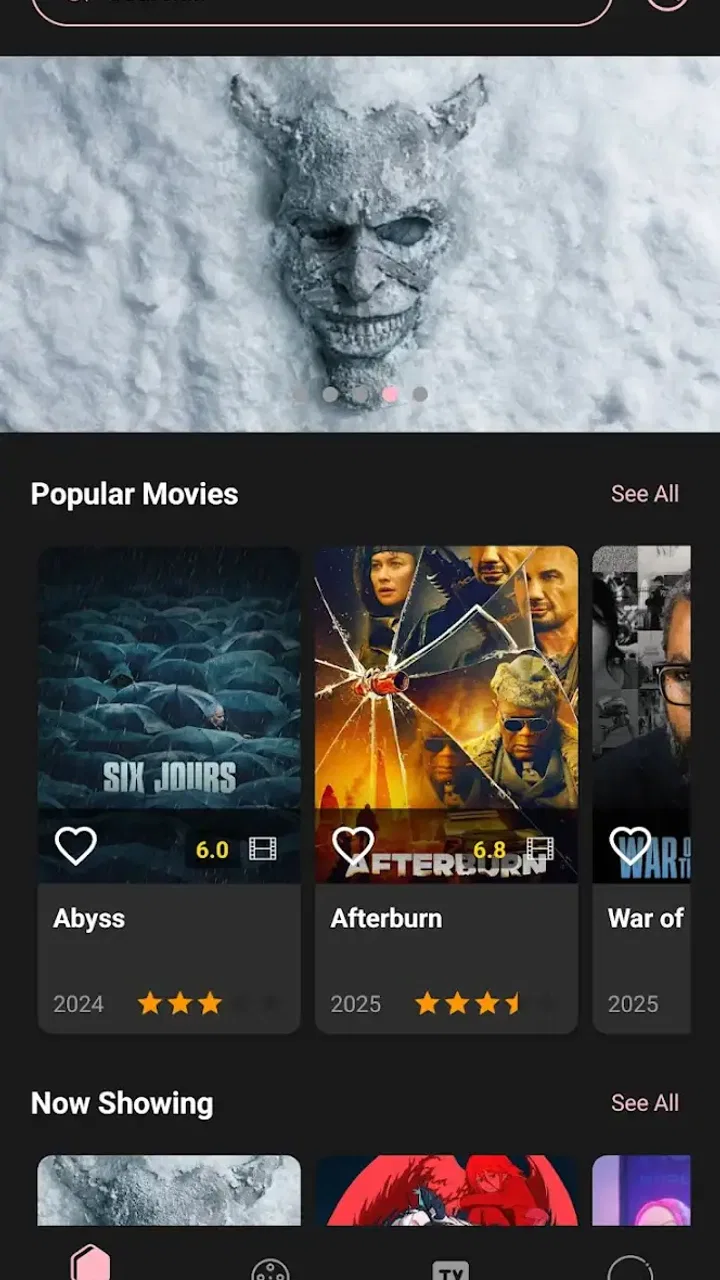
I tried Otcomlab as an entertainment app for the moments when a household wants something interesting to browse without committing to a full film, series, game, or long article. Its basic idea is simple: it brings together information about popular and classic works from around the web, giving you a place to explore titles and cultural touchpoints that might otherwise require several separate searches. That makes it more of a discovery companion than a conventional streaming service or social network.
My first impression was that its value depends on how you like to choose what to watch, read, or discuss. If you already know the exact title you want and simply need a direct route to it, a search engine or a dedicated streaming app will usually be faster. If, however, you are looking for a starting point for a shared evening, trying to remember an older work, or comparing familiar and less familiar choices, the app has a more useful role. It gives browsing itself a purpose.
How Otcomlab works in a shared household
The most convincing everyday scenario is a shared phone or tablet on a coffee table. Imagine that one person wants a classic work, another wants something more current, and nobody has a clear choice. Instead of passing the device between several services, I would use Otcomlab as a conversation starter. One person can search or browse a subject, another can recognize a title, and the group can decide what deserves a closer look elsewhere.
You May Also Like

 Blood Strike: 2.5 Anniversary
Blood Strike’s Loadouts Turn Every Drop Into a Tactical Gamble
A close look at Blood Strike’s custom loadouts: how fast access to signature weapons reshapes its battle royale rhythm, rewards preparation, and narrows the gap between fights.

 Pandora - Music & Podcasts
Pandora’s Music Is Easy to Start, but Harder to Recover
Pandora’s strength is its low-effort path from a seed to a station. Its weak spot is how much confidence it asks you to place in connection, setup, and quiet recovery.

 8 Ball Pool
 Is Built on Rivalries, Rematches, and Routine
A close look at the rivalries, rematches, shared routines, and unanswered safety questions that turn a quick pool match into a persistent mobile community.

 Samsung Music
’s Quiet Strength Is Playing What You Already Own
Its reach comes less from spectacle than from dependable access to a personal library. That simplicity is both the app’s strongest retention engine and its ceiling.

 AccuWeather: Weather Radar
AccuWeather Review: A Quick, Clear Forecast for Everyday Decisions
For everyday plans, the best forecast is the one you can understand quickly. AccuWeather makes rain timing, radar, and local conditions easy to act on, with a few trade-offs.

 Hill Climb Racing
Why Hill Climb Racing Still Turns Crashes Into One More Run
A tiny car, a bumpy hill and one more upgrade: Hill Climb Racing keeps resurfacing because its simple chaos makes every near-miss feel personal.
More From Our News Desk
View All News


That distinction matters. I do not see this as an all-in-one replacement for the entertainment apps already installed on a family device. Its job is closer to organizing curiosity. It can help turn “What should we choose?” into a manageable discussion, especially when the group has different tastes. The app’s focus on both popular and classic works is useful here because it does not limit the conversation to whatever is currently most visible.
For a household, the strongest use is not solitary endless scrolling. It is shared browsing with a clear purpose: finding a title, checking whether a familiar work is worth revisiting, or creating a small shortlist before moving to another service. I found that treating it as a reference shelf rather than a complete entertainment destination made the experience feel more focused.
There is also a practical benefit for people who often forget names. You may remember an actor, a broad theme, or the fact that something was considered a classic, but not the exact title. An information-aggregation app can be helpful at that early stage because it encourages discovery rather than demanding a perfectly formed search query. I would still expect to verify availability and details in the relevant official service before making a final plan.
What it is good at when several people are choosing
Otcomlab works best when the household needs a neutral place to begin. A streaming platform tends to show what it can play, while a social feed tends to show what is popular among its users. This app’s stated purpose points in a different direction: gathering information about works from across the web. That broader starting point can prevent the choice from being limited to one subscription, one algorithm, or one person’s usual habits.
One useful workflow is to separate discovery from access. First, use the app to collect a few possibilities. Next, discuss the age suitability, tone, and length using information available from the relevant sources. Only then open the service that actually provides the work. This avoids the familiar household problem of spending more time browsing menus than watching anything.
A second workflow is useful for older relatives or guests who do not know the latest titles. Start with a well-known classic, then use related information as a bridge toward something less familiar. I would not assume that every connection will be equally clear or that every recommendation will match the group, but the app can make the conversation less dependent on one person remembering everything.
The trade-off is that aggregation can also create distance from the final decision. The app may help you learn about a work, but it is not necessarily the place where you consume it. Anyone expecting a single tap from discovery to playback may find the process less convenient than using a dedicated entertainment platform.
Setting boundaries before handing over a shared device
Because this is an entertainment and information app rather than a private notebook, I would still establish simple household rules before letting children or younger teenagers browse independently. The content rating is Teen, so I would treat that as a meaningful age signal rather than assuming that every listed work is suitable for every member of the family. Parents should remain involved when the device is shared with younger users.
I would also avoid assuming that a shared device creates separate personal spaces. The available description does not make Otcomlab sound like a family-management tool, so I would not rely on it for individual profiles, child-specific filtering, or automatic separation of browsing histories. Those boundaries need to come from the way the household uses the device and from the operating system or other services involved.
A straightforward arrangement is to decide who uses the app and for what purpose. An adult might handle open-ended discovery, while a teenager can participate in choosing from a shortlist. If several people use the same tablet, it is sensible to avoid entering personal information into any page reached through the app unless the destination is familiar and appropriate. The app can be a doorway to wider web information, and normal online caution still applies after leaving its main browsing experience.
This is one of the less obvious points about an aggregator: the boundary of the app may not be the boundary of the experience. A title can lead to information hosted elsewhere, and the household should know when it has moved from general discovery into another website or service. I appreciate the convenience of a broad information source, but I would not confuse convenience with supervision.
Keeping the household conversation organized
Coordination is where I think the app can earn a place on a shared device. Instead of asking everyone to browse independently, one person can act as the navigator while the others explain what they want. That sounds basic, but it avoids duplicated searches and makes the decision feel collaborative. For a family with very different preferences, starting with categories of interest—such as a classic work, a familiar favorite, or something that deserves investigation—can keep the session from becoming random.
I would recommend making a short verbal shortlist rather than trying to remember every title encountered. The app is most useful when it supports a decision, not when it becomes another endless feed. Once the group has a few candidates, move to the appropriate source to check practical details such as where the work can be accessed and whether it suits the evening’s mood.
For shared use, this separation between information and action is an important trade-off. A dedicated streaming app may be better for immediate playback, but it usually organizes choices around its own catalog. Otcomlab is potentially better earlier in the process, when the household is still asking what exists and why a work matters. Neither approach is universally superior; the right choice depends on whether the group needs discovery or execution.
Another useful habit is to let different household members lead on different days. Someone interested in older works can introduce a classic, while another person can look for a popular title that the group has not discussed. This gives the app a repeatable social role without pretending that it provides built-in family coordination. The coordination comes from the people using it.
Age, trust, and the limits of shared browsing
The Teen rating should shape expectations. I would be comfortable treating Otcomlab as a supervised discovery tool for an older teenager, but I would not hand it to a young child and assume that the broad subject matter will always be appropriate. Information about popular and classic works can include mature themes even when the app itself is only presenting background material.
Trust also matters because an aggregator encourages users to follow their curiosity. That is a strength for adults and responsible teenagers, but it means the experience may wander beyond the original household plan. I would explain to younger users that the app helps find information; it does not automatically decide whether a work is suitable for them or whether an external source is trustworthy.
For a family, the best approach is transparent rather than overconfident. Discuss what the app is for, keep browsing in a common area when appropriate, and check unfamiliar destinations before using them. These are not special controls supplied by Otcomlab; they are sensible habits for any app that connects entertainment discovery with information gathered from the wider web.
I also think the app is better suited to households that value discussion than to people who want a completely personalized recommendation engine. If everyone wants a private, tightly filtered stream based on individual viewing history, a mature streaming platform or a dedicated recommendation service may feel more polished. Otcomlab’s appeal is broader and more exploratory, which can be refreshing but less precise.
Performance expectations and practical friction
Otcomlab is free, which lowers the barrier to trying it as a household reference tool. The developer is Otco Kim, and the app has reached over one hundred thousand installs, with an average rating of 3.8 from roughly two hundred ratings. Those figures suggest that people are using it, but they also tell me to keep expectations measured rather than treating it as a universally refined entertainment hub.
The current version is 1.0.6, and it runs on Android 7.0 or newer. That broad compatibility is helpful for an older family tablet that is not running the latest system software. At the same time, compatibility alone does not guarantee that every device will feel equally quick or that every external source will behave the same way. I would test it on the actual shared device before making it the household’s main discovery screen.
The absence of a purchase price is particularly useful for occasional use. A family can try it during one planning session without adding another subscription to the monthly budget. The downside is that free access should not be mistaken for a complete substitute for the services that host the works themselves. You may still need separate subscriptions, rentals, or other access arrangements after using the app to investigate a title.
My main friction point is the likely gap between learning about a work and acting on that information. When a household is impatient, every extra step can weaken the value of discovery. I would use Otcomlab before the evening begins or during a calm planning moment, not necessarily when everyone is already waiting for something to play.
Who should use it, and who should skip it
I would recommend Otcomlab to curious adults, older teenagers with appropriate supervision, and households that enjoy comparing familiar and classic works. It is especially appealing if your current routine involves jumping between search results, streaming catalogs, and remembered titles just to build a shortlist. The app can give that early research stage a clearer home.
It is also a reasonable choice for someone who wants entertainment context rather than immediate entertainment access. If you like learning why a work remains popular, revisiting older titles, or finding a starting point for a group discussion, the concept makes sense. I would use it before a family movie night, a themed weekend, or a conversation where several people want different kinds of recommendations.
I would skip it if your priority is direct playback, precise parental controls, or a deeply personalized recommendation system. A dedicated streaming app is better when the title is already known and available there. A search engine may be better for a single factual question. A specialized review or catalog service may be better when you need detailed filtering and dependable comparison tools.
The app is also not ideal for a household that expects automatic account boundaries. Since I would not assume separate profiles or child-focused controls, shared-device users should organize access themselves. That is manageable for a cooperative family, but it can become inconvenient when several people want completely separate histories and preferences.
My household verdict
After looking at Otcomlab as a shared entertainment tool, I see it as a useful first step rather than the final destination. Its appeal comes from bringing popular and classic works into one discovery-oriented space, which can make household decisions more varied and less tied to a single service. I like the idea of using it to start a conversation, build a shortlist, and then move to the right source for access.
Its limitations are equally important. It does not replace streaming access, and I would not treat it as a substitute for parental supervision, private profiles, or carefully managed household accounts. The Teen rating means adults should think about who is using it, while the external nature of broad web information calls for ordinary caution and clear device rules.
For me, the best way to use it is deliberately: open it when the group needs ideas, keep the shortlist small, discuss age and suitability together, and verify the final access route elsewhere. Used that way, the free app has a practical role without promising more than it can deliver. If your household needs a shared discovery shelf rather than another playback service, Otcomlab is worth trying; if you need instant viewing or strict personal boundaries, choose a more specialized alternative.
FAQs for Otcomlab
01What is Otcomlab and what does it offer?
Otcomlab is an innovative app designed to enhance communication skills through a variety of interactive tools and resources. It offers users a comprehensive suite of features including language learning modules, voice recognition technology, and personalized coaching sessions. Whether you're aiming to improve your public speaking or simply learn a new language, Otcomlab provides tailored solutions to meet diverse communication needs.
02Is Otcomlab suitable for beginners or advanced users?
Otcomlab caters to both beginners and advanced users with its customizable learning paths. Beginners can start with basic modules that gradually introduce new concepts, while advanced users can access more challenging content and specialized coaching. The app's adaptive technology ensures that the learning experience is aligned with the user's proficiency level, making it versatile for all types of learners.
03Are there any subscription fees for using Otcomlab?
Otcomlab offers a freemium model, providing basic features at no cost while offering premium content through a subscription plan. Users can opt for monthly or yearly subscriptions to access advanced features, such as one-on-one coaching and exclusive modules. The pricing is competitive and designed to offer value for money, ensuring users can choose according to their budget and needs.
04What devices are compatible with Otcomlab?
Otcomlab is available for both Android and iOS platforms, ensuring wide compatibility across smartphones and tablets. The app is optimized for a seamless experience on various screen sizes and system versions, ensuring that users can access its features smoothly. Regular updates are provided to ensure compatibility with the latest operating system versions and devices.
05How does Otcomlab ensure user privacy and data security?
User privacy and data security are top priorities for Otcomlab. The app employs state-of-the-art encryption and secure data storage practices to protect user information. It also follows strict privacy policies and complies with global data protection regulations. Users can review and manage their privacy settings within the app, ensuring transparency and control over their data.
Pros
- User-friendly interface and navigation.
- Wide range of customizable features.
- Seamless integration with other apps.
- Regular updates with new features.
- Efficient customer support team.
Cons
- Occasional minor bugs in updates.
- Limited offline functionality.
- Requires a stable internet connection.
- Some features locked behind paywall.
- Can be resource-intensive on older devices.

Otcomlab
Gallery